
Spreadsheet improvements 3/9: Future-Proofing
This is the third deep dive of the "9 ways to improve your spreadsheets" blog series.
This post elaborates on the importance of future proofing your sheets as requirements change.

Written By Séan Smith
Predict and prepare for future data needs
Your business needs may change over time and so will your KPI's and processes. The flow of your data may change. Your data requirements may change with time, too, as you may not need the data to be grouped at the same levels, in the same categories. However, having a clear purpose for each spreadsheet, a well-documented process for data collation and cleaning, and a logical approach to data storage will never go out of fashion.
Following these steps will ensure you have a flexible format that allows the data to be used in multiple ways. This is crucial especially when you want to see trends in your past performance data or when you need to forecast based on previous data points.

Case Study: Mobile Phone Sales
Let’s say you're analysing mobile phone sales. Today you might focus on iPhones sold on O2, tomorrow you might need to view Samsung phones sold on Three. Will your data maintain the same granularity across all possible combinations?
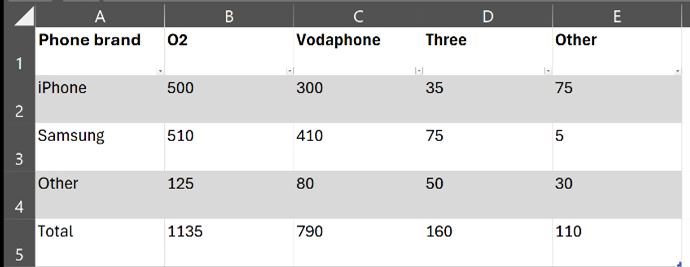
Can you easily create a summary table and filter data as needed? Can your audience find what they need in under 30 seconds? Here’s an example data summary:
Last week:
This week:
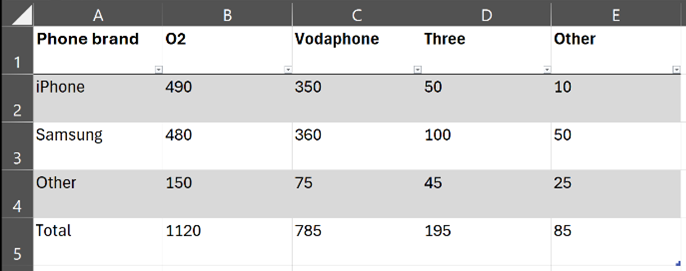
How would you future-proof the process of reporting from these two simple data sets? Each of the data summary tables present data anchored in two points, namely the brand of mobile phone and the seller, respectively. How would you take account the third dimension, meaning the date?
There are multiple ways to go about this; the best way, however, is the one that meets your reporting needs the best. For instance, you may save this data in separate tabs in in your clean data set (spreadsheet) – you can then use this data as precedent or input for future calculations and reporting in other tabs or workbooks.
As we introduced before, requirements can change and you won’t always need the data to be viewed the same ways or in the same categories, but it’s very important to have a logic to how you (a) collate, (b) process, and (c) report on your data. Here are some key considerations for data management across these 3 dimensions:
a) Data Collation
- Understand future needs: anticipate what data might be required in the future. This involves thinking about the types of questions stakeholders might ask and ensuring you collect data at the right level of detail.
- Granularity: ideally, you want to collect raw data at a granular level to allow for detailed analysis. It is much easier to synthesise data from a larger dataset than to add retrospectively.
For example, instead of just recording total sales, capture data on individual products, models, colours, and sales channels. If your marketing team also tracks customer feedback, you may add this to the “single source of truth” dataset (if the size remains manageable) by collecting data on the type of feedback (positive, negative, neutral), the product mentioned, and the date. This will allow the marketing team to analyse trends in customer preferences over time and across different products while simultaneously allowing the sales team to track the most performant sales channel.
- Storage: ensure data is stored in a structured format, such as a database or well-organized spreadsheet, making it easy to retrieve and analyse.

b) Data Processing/ Analysis
- Optimise processes:Streamline data processing to minimize manual intervention. This can mean using automated tools and Macro scripts to automate repetitive tasks.
- Contingency planning: If you need to add more granularity to your data in an additional column would this be easy to implement, or will it have significant process implications? Prepare for potential changes in data formats or structures. This might involve creating flexible data import processes that can handle variations in data sources.
- Scalability:Ensure your data processing methods can scale with as the data volumes increase. This might involve using Excel's Power Query to handle large datasets efficiently or optimizing the Macros for efficiency.
c) Data Insights/ Reporting
- Long-term reporting:Consider any long-term needs that may necessitate changes in reporting requirements. A good practice to this end is maintaining past performance data in a format that allows for easy comparison over time so ensure you keep as much relevant data in your spreadsheet as possible. Ask yourself: has the purpose changed recently, and will it change back? If so, is it possible to stick with the lowest granularity of data? Can we retrieve past data at that level if we need it?
- Relevance: When we set up data, at each stage we think about purpose, frequency of use, and reporting process. Ensure that data can be easily restructured to meet changing needs. This means regularly reviewing and updating the data you collect to ensure it aligns with current goals.
- Automation: Ask yourself: is this data a one off or do you need to productionise the process to save time in future? If the answer is “yes” then automate the data collation and collection to save time in the long run. This may require an initial time investment, but it will certainly pay off!
For example, instead of manually collecting data from social media platforms, use automated scripts and tools such as the aforementioned Power Query to pull data automatically into your analytics tool. This saves time and ensures you have up-to-date information for your reports.
- Accessibility: store data in a way that allows for easy adjustments in reporting. Use PivotTables and PivotCharts to create clear and informative reports.
- Flexibility: Make sure reports are easy to generate based on the data collected. This might involve using visualization tools to create clear and informative charts and graphs.
By following these principles, you can ensure your data remains useful and accessible, providing valuable insights for your business on the long run.
Would you like to talk to us about ways to future-proof your processes? We’d like to have a chat! Feel free to contact us for a free consultation.