
Spreadsheet improvements 2/9: KPIs
This is the second deep dive of the "9 ways to improve your spreadsheets" blog series. This post elaborates on the importance of ensuring all stakeholders have access to the relevant data.
Using data can be a headache all on its own. But if data isn’t easy for you to find, then that headache can be even worse. Here's how to avoid that.

Written By Séan Smith
Make your key data easy to find
Most spreadsheets are designed to process data and deliver a few key figures, such as sales figures for the Senior Leadership Team (SLT).
Making these figures easy to find can save time, energy, and prevent unnecessary questions.
Do you have cells highlighted with keys figures for regular reporting? Or an easy-to-find table on a tab called ‘Reports’?
These are simple fixes to make KPIs easier to find, however but they are not the only ways to streamline data retrieval.
A logical setup to your spreadsheet can save hours when you need to make changes or even just find that ever-elusive set of numbers.
Think about:

1. Save regularly
Ensure you don’t lose changes made, especially if you’ve moved or renamed a spreadsheet to make it easier to find.
2. Organise tabs by a RAW-to-Results logic
Data can be hard to find in a big spreadsheet, so when creating or editing, make sure you arrange the tabs in logical order. We suggest the Raw-to-Results approach.
Apply this in a way that suits you best; it doesn’t mean the tab with the Raw data must first on the left (actually, most users will be more interested in the Results tab rather than a breakdown of how the data was processed). As long as there is a logic that you include in your documentation, you are on the right track. For example, you may have tabs with results by postcode or zip code, city, county, etc.
3. Clearly label tabs, graphs, and charts
Building on the point above, clear labelling helps stakeholders decipher information more easily. This leads to fewer queries and faster error tracking in reports.
4. Freeze panes
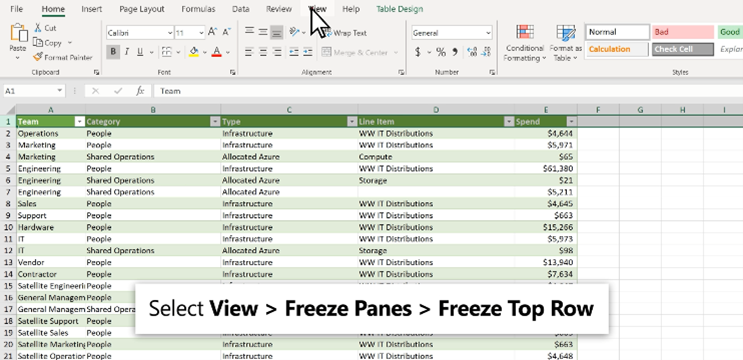
By using freeze panes you lock rows and columns making them visible at all times when scrolling through the spreadsheet. This will make your life easier while checking data and hopefully help your stakeholders can easily identify and access information. This is very useful especially when dealing with a big dataset.
For example, if you want to see the column and row headings, they are usually the first column and the first row (click on the screenshot below to visit the Microsoft Support feed on freeze panes):
5. Track errors with ‘trace precedents’ and ‘trace dependents’
If a formula uses precedent or dependent cells it may be difficult to check for accuracy or to find the source of an error. That’s where trace precedents and trace dependents command comes in to save the day!
First off, what are precedents in dependent cells you ask? Precedent cells have data that is referred to in a formula in another cell – for example, the sales data for a particular month is a precedent for the cell where the total is calculated. In the same example, the ‘Total cell’ is a dependent cell for the monthly sales cells as it depends on the data referred to for input. The valuable thing about trace precedence and trace dependence commands is that it allows you to check formulas by providing ‘tracer arrows’. The tracer arrows will be blue when cells show no errors, and red arrows indicate cells that contain or create errors.
Having error-free data is key for achieving your KPIs!
6. Target data to the audience
Know your audience, learn their needs, and tailor your data accordingly. As simple as it sounds, provide sales figures for sales teams, marketing data for marketing teams, and a one-page summary for the SLT. This is intuitive, but often processes get overcomplicated over time, or due to changes in the purpose of a spreadsheet the knock-on effects lead to errors in reporting or poorly targeted reporting.
Keep it simple but purposeful; keep it streamlined; keep it targeted.
7. Map and document the data flow
Can you explain what happens if you stop producing a report? Do you know who receives your reports? When was the last time you asked stakeholders if they are getting what they need? If you want to learn more about the answers to these questions, here is our dedicated blog post on documentation.
In brief, the most striking example of the value of mapping your data flow presents itself when having to combine data from different sources. Chances are that if you're dealing with combined data, the raw version of those datasets is most likely unstructured and complex. As you're processing and cleaning the raw data make sure you document the process step-by-step.
Documenting the process helps resolve disagreements on how to measure outcomes and provides clarity for attaining KPIs.
8. Enable self-service reporting
Can stakeholders access their figures in 30 seconds or less? If the answer is no, that's your opportunity for improvement.
It's easy to get lost in processes but, if we may use a metaphor, try to visualize the process as a physical office space. Do the right team members have access to the correct filing cabinet? If it contains information on a “need to know basis”, is that filing cabinet locked (i.e., does it have the appropriate security features)? Are the folders in the filing cabinet correctly labeled and sorted so that the information is easy to find?
People can be impatient and in business, time is money so make sure that you provide guides, centralized repositories, and simple filing systems with clearly labelled files.
9. Use the right tools or innovate if you don’t just yet
Automating processes is your lowest hanging fruit. In our “Spreadsheet improvements 9/9: Innovation” blog post we talk about the value of having a “people first” approach to automation of work currently done manually. This frees up cognitive space for people to engage in creative and strategic work, rather than in soul-crushing repetitive tasks that can be done faster and with a lower chance of errors than manual input.
Consider the raw-to-report three-step process we discussed previously where you split your data flow across (a) data collection, (b) data processing and (b) reporting. Especially for the third step, automating your reporting may save you considerable resources. To that end a spreadsheet may not suit your needs and a dashboarding tool may be the innovation that you just might need!
Would you like to talk to us about ways to improve the way you attain your KPIs? We’d like to have a chat! Feel free to contact us for a free consultation.